Accessibility Overlays & EAA: Why Overlays Are Not a Solution
Information about the article

Author: Dmitry Dugarev
In your search for EAA compliance, you have surely come across accessibility plugins – the so-called Accessibility Overlays. These are the small icons (such as those from Userway, AccessiBe, or Eye-Able) that cling to the edge of a website and promise to make the page accessible with a single click [1].
This sounds like a magical, quick fix – almost too good to be true. And unfortunately, it is.
As someone deeply involved in this topic, I want to explain why these tools are not the solution they promise, and why they are insufficient for genuine, legally compliant accessibility under the European Accessibility Act (EAA).
What Exactly Are Accessibility Overlays?
Imagine overlays as a kind of "layer of varnish" placed over your actual website. If you search for accessibility overlays, you will find them from many providers, e.g., AccessiBe, UserWay (see Figure 1.1), Eye-Able, EqualWeb, or DIGIaccess.
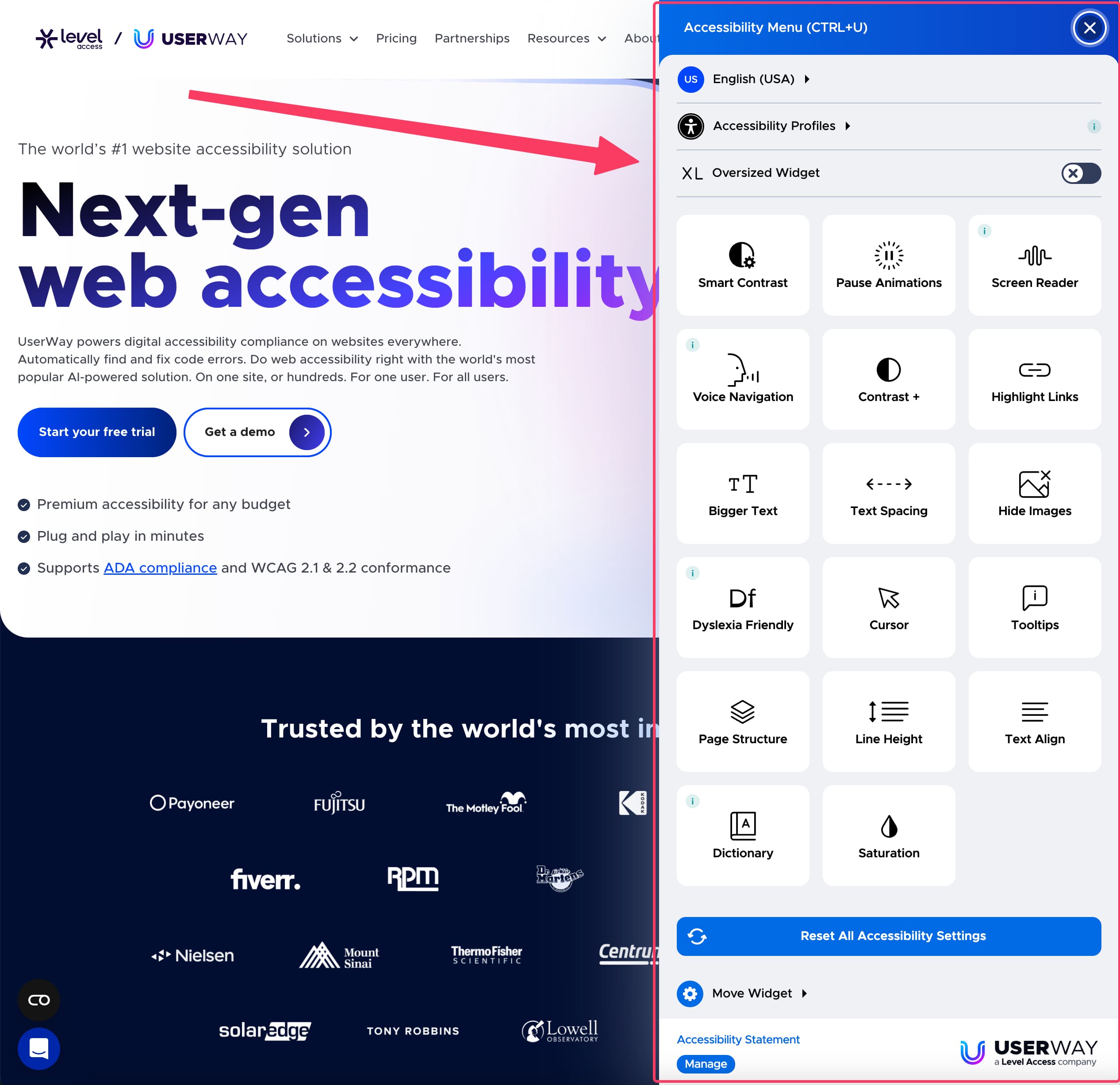
Technically, it is usually a single snippet of third-party JavaScript code that you embed on your site. These tools are prominently used on many well-known websites – from Toshiba to Hypovereinsbank to Beyond Meat.
They promise to do two things:
- Display a Widget: They offer users a menu with options to change font size, adjust contrasts, or stop animations, for example.
- Automatic "Repair": They scan your page's code and attempt to automatically correct detected accessibility issues in the background.
The providers' promises are often grand and sound impressive. They offer functions at the push of a button such as:
- Adjustment of font sizes, line and character spacing.
- Various contrast modes (e.g., negative contrast).
- Stopping animations and videos.
- Automatic generation of missing Alt texts for images using AI.
- Highlighting links and clickable elements.
The only problem is: these automated corrections are error-prone, and the functions are often inadequate, as we will see shortly.
The Problems: Why Overlays Do More Harm Than Good
The providers' promises are grand, but in practice, and especially from a legal perspective, these tools are highly problematic.
- Technical & Legal Defects
- User Experience (UX)
- Data Protection Nightmare (GDPR)
The biggest problem: Overlays cannot establish full compliance [1].
- Not a Panacea: They cannot fix fundamental structural errors in your website's code. If keyboard navigation is broken from the ground up, an overlay often cannot reliably "patch" it. The source code itself must be adjusted for this (e.g., with our Semanticality™ Plugin).
- Unreliable AI: Automated correction is error-prone. While an AI can recognize an image and insert "Man at desk" as Alt text, it does not understand the context. If the image shows a quote from Steve Jobs, the correct Alt text would be the quote, not the image description.
- Modern Technology: They often have massive problems with modern JavaScript frameworks (like React or Vue) that dynamically load content.
- Blind Spots: They cannot fix barriers in PDFs, SVGs, media files, or canvas elements.
Legal compliance (e.g., according to WCAG) means that all criteria are met. A tool that covers only a fraction of them, maybe and unreliably, is not enough.
Ironically, overlays often make the website less usable for people with disabilities [2].
- Redundant Functions: Most widget functions (zoom, contrast) are already built into the operating system (Windows, macOS) or browser. Users who rely on such features already have their own, often much better tools active.
- Negative Interactions: The overlay can conflict with the users' actual assistive technologies (e.g., screen reader software like JAWS or NVDA). The result: the page slows down, crashes, or becomes completely unusable.
- Poor Performance: Overlays can increase your website's loading times and lead to unexpected behavior.
A WebAIM survey of accessibility practitioners [4] found that 72% of respondents with disabilities rated the tools as "not effective" or "not effective at all."
An often overlooked but critical point: These plugins are often a data protection trap.
- Collection of Sensitive Data: Some tools automatically detect if you are using a screen reader to activate "helpful" settings [2]. However, by doing so, they collect sensitive health data (namely your visual impairment) without your consent, according to Art. 9 GDPR [3].
- Tracking Without Consent: Many overlays set cookies to save your settings across different websites. This often happens without explicit opt-in and without a clear opt-out option, violating the GDPR [3].
- Data Leakage to Third Parties: You embed a script from a (often US-based) third-party provider. The tools send your users' data (like IP addresses) to their own servers and can link it there with the collected health data [3]. Since Schrems II [5], this data leakage has been a legal minefield.
For a company in the EU, the use of such tools is therefore also extremely risky from a data protection perspective.
What Do German Authorities Say About This?
This is where it becomes particularly clear for the EAA. The official federal and state monitoring bodies published a joint assessment of overlay tools in March 2025 [1].
The conclusion is unambiguous:
The authorities even warn that the use of overlays can lead to a "deterioration of accessibility" precisely because they conflict with users' assistive technologies [1].
What Do International Experts Say About This?
It's not just the German authorities. Worldwide, there is a massive consensus against these tools.
Over 800 international accessibility experts have signed the "Overlay Fact Sheet" [2]. These include:
- Contributors to the WCAG standards themselves.
- Internal accessibility experts from Google, Microsoft, and Apple.
- Developers of screen readers (like NVDA) and disability rights lawyers.
For example, here is what Steve Faulkner, a leading expert and member of the W3C Web Platforms Working Group, says in his article [6]:
"If a site currently has fundamental accessibility problems – such as missing alternative text for images, missing structural markup that correctly and semantically identifies page elements (headings, lists, labels/names for form controls), incorrectly implemented interactive widgets and controls that cannot be operated correctly with a keyboard and/or assistive technologies – bolt-on solutions won’t be the answer, and they won’t automagically fix these underlying issues."
Steve Faulkner, Member of the W3C Web Platforms Working Group and the W3C ARIA Working Group, and editor of several W3C specifications
The tenor is unanimous: Overlays do not solve the core problems but often create new ones. They are not a reliable solution for true accessibility.
A Look at the USA: Lawsuits Despite Overlays
In Germany, at the time of this article's publication, there are (still) no judgments on this. In the US, they are already further along. The legal basis there is the ADA (Americans with Disabilities Act) [7].
The main selling point of many overlay providers is the avoidance of lawsuits. The reality looks different. Lawyer Richard Hunt pointed out a wave of lawsuits already in 2020 that were filed despite the use of overlays [8].
Here are some of these cases and the specific defects complained about by plaintiffs (often screen reader users) – defects that the overlay obviously could not fix:
- Walters v. Venum
- Williams v. VaporDNA
- Nellon v. Agri Beef Co.
- Ariza v. Carmen Sol
- Cruz v. Rockwell Time
Case: Walters v. Venum Training World, Inc. [11] Overlay: UserWay
Let's look at this case first. UserWay's overlay was in use here, but the lawsuit still came. Why? Because users with screen readers had massive problems.
They got stuck in a "Keyboard Trap" – imagine navigating into a menu using the Tab key but never being able to get out. Essential shop functions like "Select weight" or "Add to shopping cart" were simply unusable for them.
The height of irony: The overlay icon itself, which was supposed to help, was often inaccessible. According to the complaint, it only loaded correctly in 4 out of 10 attempts and was invisible to screen readers. The supposed aid thus became the first barrier itself.
Case: Williams v. VaporDNA [12] Overlay: AccessiBe
Another example, here with the well-known AccessiBe overlay. The points of the complaint read like the basic principles of accessibility that should have been solved:
Alt texts were missing for images, form fields were incorrectly labeled (no label or title attributes), all pages had the same title tag (making orientation impossible for screen readers), and there were broken links.
To be fair, it is possible that the tool was installed only after the lawsuit as a panicked "first aid measure." However, it perfectly demonstrates that even the most basic, automatically verifiable errors were clearly not fixed.
Case: Fredericka Nellon v. Agri Beef Co. [13] Overlay: AccessiBe
AccessiBe was also in use in this case. Here, users encountered different, but equally frustrating, barriers. Imagine a pop-up advertisement appearing – but your screen reader tells you nothing about it, and you cannot find a button to close it. You are stuck.
That is exactly what happened. Important information like discount codes was only "burned in" as text within an image and had no Alt text, making it invisible to the blind. And if an error occurred during registration, the error messages were simply not transmitted to the screen reader. The user thus did not know why they could not proceed.
Case: Ariza v. Carmen Sol FL, LLC [14] Overlay: AccessiBe
This case (again with AccessiBe) shows how quickly e-commerce functionality breaks down. The navigation was broken because drop-down menus were not correctly labeled for screen readers.
The large image slider on the homepage was neither operable nor labeled – thus pure "visual noise." And in the shop, you could not select the quantity of a product. These are absolute deal breakers that the overlay obviously failed to recognize or repair.
Case: Cruz v. Rockwell Time, Inc. [15] Overlay: Accessibly (by On The Map Marketing)
Finally, this case. Another tool called "Accessibly" was in use here. The interesting point: the list of defects is exactly identical to that in the VaporDNA case.
Missing Alt texts, no form labels, identical title tags, broken links. This is a strong indication that law firms use automated scanners to find these "easy targets." And these scanners are not fooled by an overlay icon. They check the real, underlying code – and if it's broken, it's broken.
Although these rulings originate in the USA, it is highly likely that courts in the EU and Germany will adopt a similar stance within the framework of the EAA: a tool that does not establish accessibility is not a fulfillment of the legal obligation [1].
The Real Solution: Your Step-by-Step Plan
Okay, if the "magical" accessibility overlays are not the answer – what is?
The only sustainable and legally compliant solution is to understand accessibility as a process from the start. Instead of a subsequent "layer of varnish," you need a solid foundation directly in the code.
German authorities clearly state this:
The goal of sustainable accessible design should be to comprehensively consider the requirements for full accessibility already during the conception of the respective part of the website. [1]
Here is a concrete plan on how you can approach this:
Honest Inventory (Accessibility Audit)
You cannot solve problems you do not know about. Before you do anything, you need to know where you stand. How many barriers does your website have and how severe are they?
- Start Yourself: Grab our free EAA checklist. It gives you a quick initial overview of the most obvious defects.
- In-Depth Analysis: A professional audit is essential for a legally sound action plan. This is the foundation for all subsequent steps.
Check Exceptions (Action Plan)
With the audit report in hand, you now check your legal obligations. Not every single barrier must be fixed immediately or at all if the effort required is extremely high.
- Check whether the Disproportionate Burden (§ 17) applies to individual points from the audit.
- Look at whether other Special Regulations or Exceptions are relevant to you (e.g., for certain content or internal tools).
Build Team Knowledge (Training)
Accessibility is not a one-time project you check off, but a continuous practice. Your team must understand why and how to write accessible code.
- Build Basics: Developers and editors must be trained to correctly implement things like semantic HTML, correct Alt texts, form labels, and keyboard operability from the ground up.
- Intensive Training: We impart exactly this practical knowledge in our 4-Day EAA Workshop so that your team can implement accessibility independently.
Remediation (Implementation)
Now it is time to get to work. Based on your plan and knowledge, remediation of errors in the source code begins.
You now have a clear roadmap that you can either pass on to your development team or implement together with us.
Decision Tree: Overlay Yes or No?
Based on the assessment of the authorities [1], there is actually only a tiny use case. This decision tree helps you:

Text description of the decision tree
Do I need an overlay for accessibility on my website?
First: Is my website already EAA or WCAG 2.1 AA compliant?
If not, then: An overlay is not a solution. Instead, the existing barriers should be fixed directly in the source code [1].
If yes, then: Do I want to offer additional AAA functions, for example, better visual adjustments or increased text spacing?
If no, then: The website is sufficiently accessible. An overlay is not necessary.
If yes, then: Is the overlay tool itself fully accessible, can it be switched off, and does it function smoothly with assistive technologies like screen readers or keyboard navigation?
If this is not certain or if the tool creates barriers, it should not be used [1].
If the tool is demonstrably accessible and compatible, it can be considered for this specific purpose – i.e., as an addition for comfort functions [1].
| Step | Decision | Result |
|---|---|---|
| Website not WCAG compliant | Do not use overlay | Fix errors in the code |
| Website WCAG compliant, no additional functions needed | Overlay not required | Done |
| Website WCAG compliant, overlay planned | Only use if the overlay is accessible, switchable, and conflict-free | Optional |
Conclusion
As a "magical" solution that solves all problems with a single line of code, accessibility overlays are a tempting idea. The reality is sobering: they cannot reliably meet the fundamental requirements of accessibility [1].
They are, at best, a "layer of varnish" on a broken foundation. In the worst case, they create new barriers, frustrate users, and lull you into a false sense of legal security. German authorities clearly advise against relying on them, and US case law shows that this protection does not exist [9].
My urgent advice: Do not invest your budget in software that only covers up problems. Invest it in clean conception and accessible code. There are tools for this, such as Semanticality™ Plugin, which help you make the work significantly easier. This is the only sustainable and legally compliant way to truly make your digital offerings accessible to everyone.
Frequently Asked Questions (FAQ)
Are users with disabilities not better supported by overlays?
Mostly no. Many functions (zoom, contrast) are redundant because they are already available in the operating system or browser. Even worse: they can conflict with the actual assistive technologies (like screen readers) and make the page less usable [2].
But providers advertise 100% compliance, don't they?
These claims should be treated with extreme caution. German authorities state clearly that an automatic, temporary solution does not meet the legal requirements [1]. Complete compliance cannot be achieved through an overlay.
Can I use an overlay as a "first aid measure" until my site is rebuilt?
This is risky and offers no legal security. As the US cases show, it does not protect against lawsuits [12]. German authorities advise against it because they can create new problems [1]. The focus should always be on fixing the errors in the code.
Isn't an overlay better than nothing at all?
Not necessarily. Since they often conflict with assistive technologies, many users report that the page is less usable than before. A "deterioration of accessibility" is possible [1].
Disclaimer
The contents of this article have been researched to the best of our knowledge and are intended solely for general informational purposes. They do not constitute legal advice and cannot replace individual legal consultation that takes your specific situation into account.
For accuracy, completeness, and timeliness of the information, no guarantee can be given. Any actions you take based on the information provided here are at your own risk.
About the author