Semanticality™ Plugin for WordPress Gutenberg.

Take control of the HTML tags and attributes of your WordPress Gutenberg blocks and implement WCAG/EAA-relevant markup changes at render time in hours – instead of spending months on theme code modifications.

Why is genuine accessibility so difficult in WordPress?

You know the feeling: A client loves the design of their new premium theme, but the HTML code generated by Gutenberg is a semantic minefield. This is where Semanticality™ comes in.

What is Semanticality™ for? – Demo Video

In this short video you will learn how Semanticality™ helps you control the HTML semantics of your WordPress Gutenberg blocks and implement WCAG/EAA-relevant markup changes quickly and easily.

Genuine accessibility arises through correct, semantic HTML code – but this is exactly where developers quickly reach their limits with WordPress: There are hardly any possibilities to customize the code without completely reprogramming the theme.

Comparison between non-semantic and semantic HTML

Classic WordPress Gutenberg block with incorrect HTML semantics

  • No semantic HTML & WAI-ARIA.
  • No way to quickly skip the blocks with a screen reader.
  • It is not clear what is a heading and what is plain text here.
  • Violation of WCAG 2.2 success criteria 1.3.1, 2.4.4, 2.4.10 and 4.1.2 → EAA compliance not achieved***.

<div class="wp-block-card">
  <div class="wp-block-card__title">My card title</div>
  <div class="wp-block-card__content">Card content is here</div>
  <div class="wp-block-card__link" onclick="location.href='/mehr'">read more</div>
</div>
      

After customization with Semanticality™ Plugin

  • Card marked up as article.
  • Marked as a landmark by aria-labelledby.
  • Content hierarchy established by h3 and p.
  • The WCAG 2.2 success criteria 1.3.1, 2.4.4, 2.4.10 and 4.1.2 are met → EAA compliance achieved***.

<article class="wp-block-card" aria-labelledby="wp-block-card__title-1">
  <h3 class="wp-block-card__title" id="wp-block-card__title-1">My card title</h3>
  <p class="wp-block-card__content">Card content is here</p>
  <a href="/more" class="wp-block-card__link" aria-label="Read more about 'My card title'">read more</a>
</article>
      

Especially in the context of the new EAA (BFSG), this is indispensable to meet the legal requirements. Semanticality™ is ideal for implementing the HTML-related measures in a few hours instead of months after an EAA Audit*.

  • The technical basis of your work

    With Semanticality™ you work directly on the HTML structure that underlies the Accessibility Object Model (AOM). In the Gutenberg Block Editor you correct the code graphically based on rules – these are applied during rendering.

    Representation of a website with faulty structure that is corrected by rules in Semanticality™ at render time.
    Website

    You correct the faulty HTML code with Semanticality™ before it is converted into a node tree structure with correct hints.

    AOM ProcessRepresentation of a node tree diagram showing the relationship between website, screen reader, and user.
    Screen Reader

    Users can easily navigate and have content read out thanks to the correct AOM.

    User
    Schema of the AOM process: With Semanticality™ you modify the HTML code before it is converted into a node tree structure (AOM) that screen readers can read.
  • Accessibility standards you meet

    With Semanticality™ you create the technical basis for central requirements from WCAG 2.2 / EN 301 549 / BITV 2.0 / EAA (BFSG) – where semantic HTML code & ARIA are required – completely without theme modifications**.

    • ISO 40500:2012

      International standard for accessibility

    • WAI-ARIA

      Technology for implementing accessibility

    • WHATWG

      HTML5 standard

    • WCAG 2.2 AA

      International guidelines for website accessibility

    • EAA

      Requirements for D2C / B2C companies in the EU

    • BITV 2.0

      Requirements for public bodies in Germany

    • ADA

      American accessibility legislation

    • BFSG

      Implementation of EAA in Germany

    Overview of legal requirements for accessible websites as well as technical standards and guidelines.
  • A robust foundation. For every user.

    Adapt your Gutenberg blocks in the shortest time and optimize your website for accessibility** and EAA compliance*** in hours instead of months*.

    Get started with Semanticality™ now
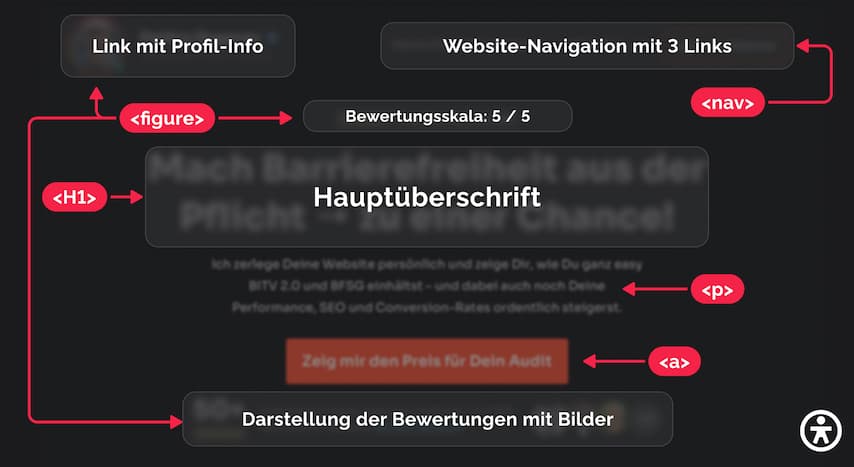
    A non-accessible website that does not use semantic HTML tags and no WAI-ARIA attributes remains inaccessible to screen readers.
    A barrier-free website with semantic HTML tags and excellent WAI-ARIA attributes is accessible to screen readers - the result of the work of Barrierenlos℠.
    A comparison between a non-accessible website (top) and an accessible website (bottom) shows how the work of Barrierenlos℠ improves the accessibility of websites for people with disabilities.

More than just an attribute plugin. Granular control. Over every Gutenberg block.

Other plugins often only allow the addition of simple attributes to the main wrapper of a Gutenberg block.

Semanticality™ goes crucial steps further and gives you granular control over every single element within your WordPress Gutenberg blocks.

    Overlay Widgets

    Overlay widgets promise accessibility at the push of a button but are only a plaster. They do not change the underlying code and are usually not sufficient for genuine accessibility or compliance [1].

    • No semantic correction: A div that looks like a button remains a div – unusable for screen readers and not focusable.
    • Legal uncertainty: Since the actual deficiencies remain, overlays offer no guarantee of compliance with laws such as the EAA (BFSG). You risk your customers' compliance.
    • Performance & Conflicts: Additional JavaScript slows down the page, causes script conflicts and degrades the user experience.

    Other Plugins (e.g. Attributes for Blocks)

    These plugins offer very limited customization and are not intended for accessibility. They are unsuitable for complex layouts or complete control.

    • Limited customization options: Changes only possible on the main wrapper of a block.
    • No adjustment of nested elements: e.g. a link in a card.
    • HTML tags cannot be changed: e.g. a div cannot be converted into a button.
    • No global rules or dynamic variables: e.g. no possibility to create a rule for all buttons in a block.
    • No security: Static values are saved in the content and can cause unpredictable errors if deactivated.
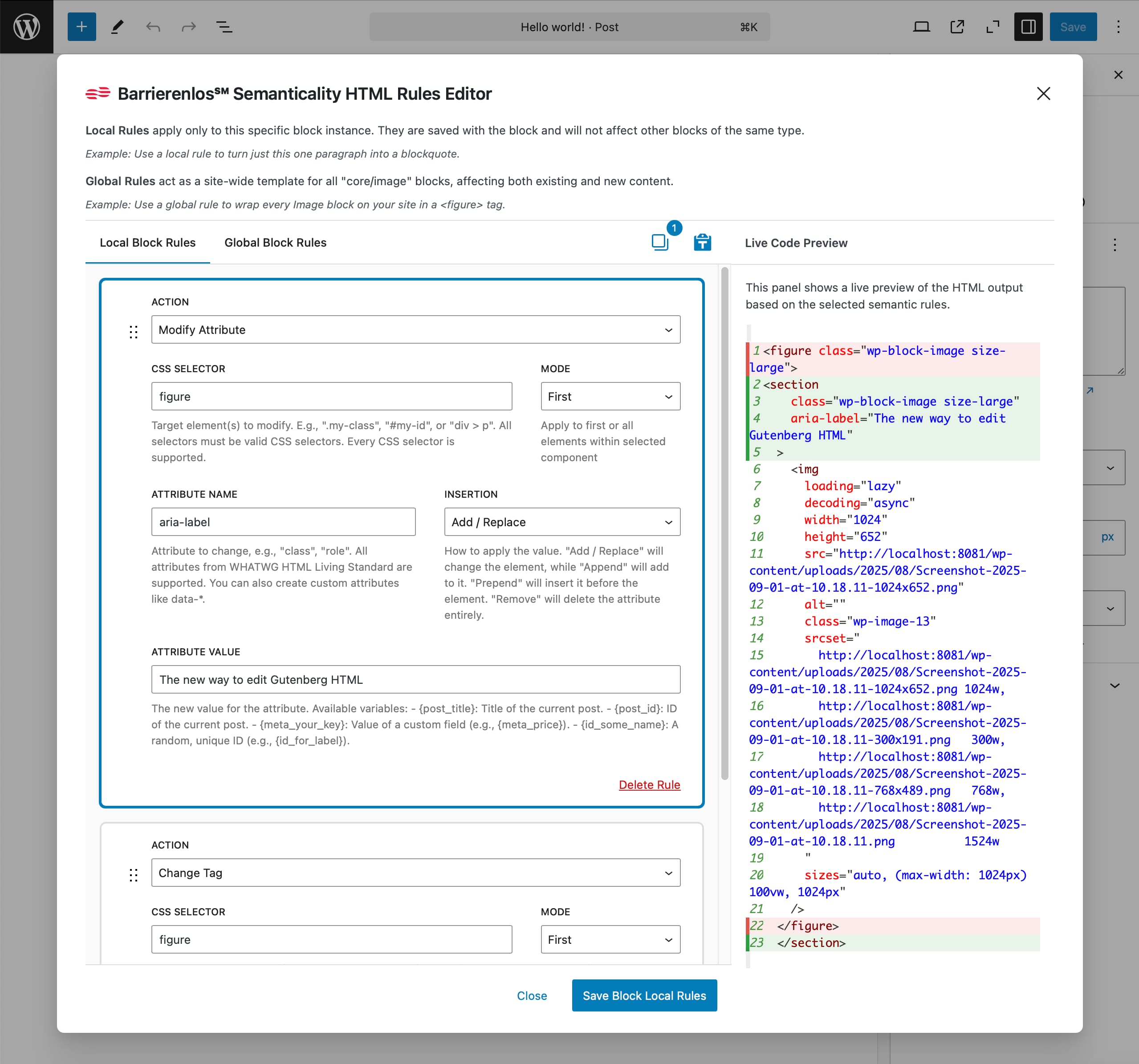
Screenshot of the Semanticality™ Rules Editor in the Gutenberg Block Editor
    • 1.1.1 (A) WCAG 2.2

      Have you provided meaningful text alternatives for all non-text content?

    • 1.3.1 (A) WCAG 2.2

      Have you ensured that information and their relationships are programmatically discernible?

    • 1.3.2 (A) WCAG 2.2

      Is the content presented in a meaningful sequence so that the meaning is maintained?

    • 1.3.3 (A) WCAG 2.2

      Do instructions not rely exclusively on sensory characteristics?

    • 1.3.4 (AA) WCAG 2.2

      Is the content not restricted to a single orientation?

    • 1.3.5 (AA) WCAG 2.2

      Can the purpose of each input field be programmatically determined?

    • 1.4.1 (A) WCAG 2.2

      Is color not used as the sole means of conveying information?

    • 1.4.2 (A) WCAG 2.2

      Can you control automatically playing audio (pause or stop)?

    • 1.4.3 (AA) WCAG 2.2

      Have you ensured an adequate contrast ratio between text and background?

    • 1.4.4 (AA) WCAG 2.2

      Can the text be resized up to 200% without losing content?

    • 1.4.5 (AA) WCAG 2.2

      Is text not unnecessarily presented as an image?

    • 1.4.10 (AA) WCAG 2.2

      Does the content adapt flexibly to different screen sizes without losing information?

    • 1.4.11 (AA) WCAG 2.2

      Do non-text elements (icons, buttons) have an adequate contrast ratio?

    • 1.4.12 (AA) WCAG 2.2

      Are text spacings chosen so that the text remains easily readable even with adapted presentation?

    • 1.4.13 (AA) WCAG 2.2

      Are additional contents that appear on hover or focus not unintentionally hidden or covered?

    • 2.1.1 (A) WCAG 2.2

      Can you operate all functions of your website exclusively with the keyboard?

    • 2.1.2 (A) WCAG 2.2

      Can you leave the keyboard focus of every element again?

    • 2.1.4 (A) WCAG 2.2

      Are keyboard shortcuts only active when the corresponding element is focused, or can they be disabled?

    Excerpt: WCAG 2.2 criteria that you can address with Semanticality™ using semantic HTML & ARIA.

    Semanticality™ Plugin for WordPress Gutenberg

    With Semanticality™ you get granular control over the HTML output of every Gutenberg block – dynamically, securely and server-side. You define rules, Semanticality™ implements them automatically in the code. Here is the full range of functions:

    • Element addressing via CSS Selector.
    • Change HTML tags (e.g. div to button).
    • Add & remove attributes.
    • Extend attributes (append, change, prepend, replace).
    • Global rules for block types.
    • Local rules for individual blocks.
    • The ability to define rules for child blocks within parent blocks (e.g. create a rule for all paragraphs in a group).
    • Copying and inserting of rules between blocks.
    • Access to WordPress meta fields.
    • Random IDs generated.
    • Live preview of rendered code directly in the block editor.

    The Result: Up to 10x faster project implementation*, predictable costs and a clear competitive advantage for you and your customers.

    Get started with Semanticality™ now

Is Semanticality™ actually suitable for your project?

Everything that goes beyond the structure & semantics of the HTML must be solved in design, content or JS, and therefore not with Semanticality™.

What Semanticality™ Plugin is not intended for:

  • No replacement for content work: Meaningful alt texts, clear language, error texts, understandable phrasing and information architecture must be provided editorially.
  • No color/contrast adjustments: Contrast values and non-text contrasts (e.g. 1.4.3, 1.4.11) require CSS/design.
  • No focus appearance per se: Visible focus and focus appearance (2.4.7, 2.4.11–2.4.13) require CSS/interaction logic.
  • No layout/reflow handling: Responsive reflow, text spacing, target size (1.4.10, 1.4.12, 2.5.8) are styling topics.
  • No control over dynamic interactions: Solving keyboard traps, drag/drop alternatives, shortcut logic, overlay behavior (e.g. 2.1.2, 2.5.7) require JS.
  • No generation of media alternatives: Subtitles/AD/transcripts for time-based media (1.2.x) must be provided by you.
  • No control over automatic audio/timers: Autoplay control, pauses, timeouts & animations (1.4.2, 2.2.x, 2.3.x) are outside the block HTML.

1. Does your project use Gutenberg blocks (not Elementor/Divi)?

Semanticality™ intervenes server-side in the final HTML output of the Gutenberg blocks. Page builders like Elementor/Divi are not compatible.

Semanticality™ is a Swiss Army knife for the semantics of your website. It helps you address many important WCAG 2.2 criteria that are based on correct HTML & ARIA**.

Case Study: A div becomes an accessible section.

In a few clicks you convert a purely visual container into a semantically correct section with landmark according to WCAG 2.2 techniques ARIA11 and ARIA13.

This improves orientation for screen reader users and is sufficient to meet WCAG 2.2 success criteria 1.3.1 "Info and Relationships" and 2.4.1 "Bypass Blocks"***.

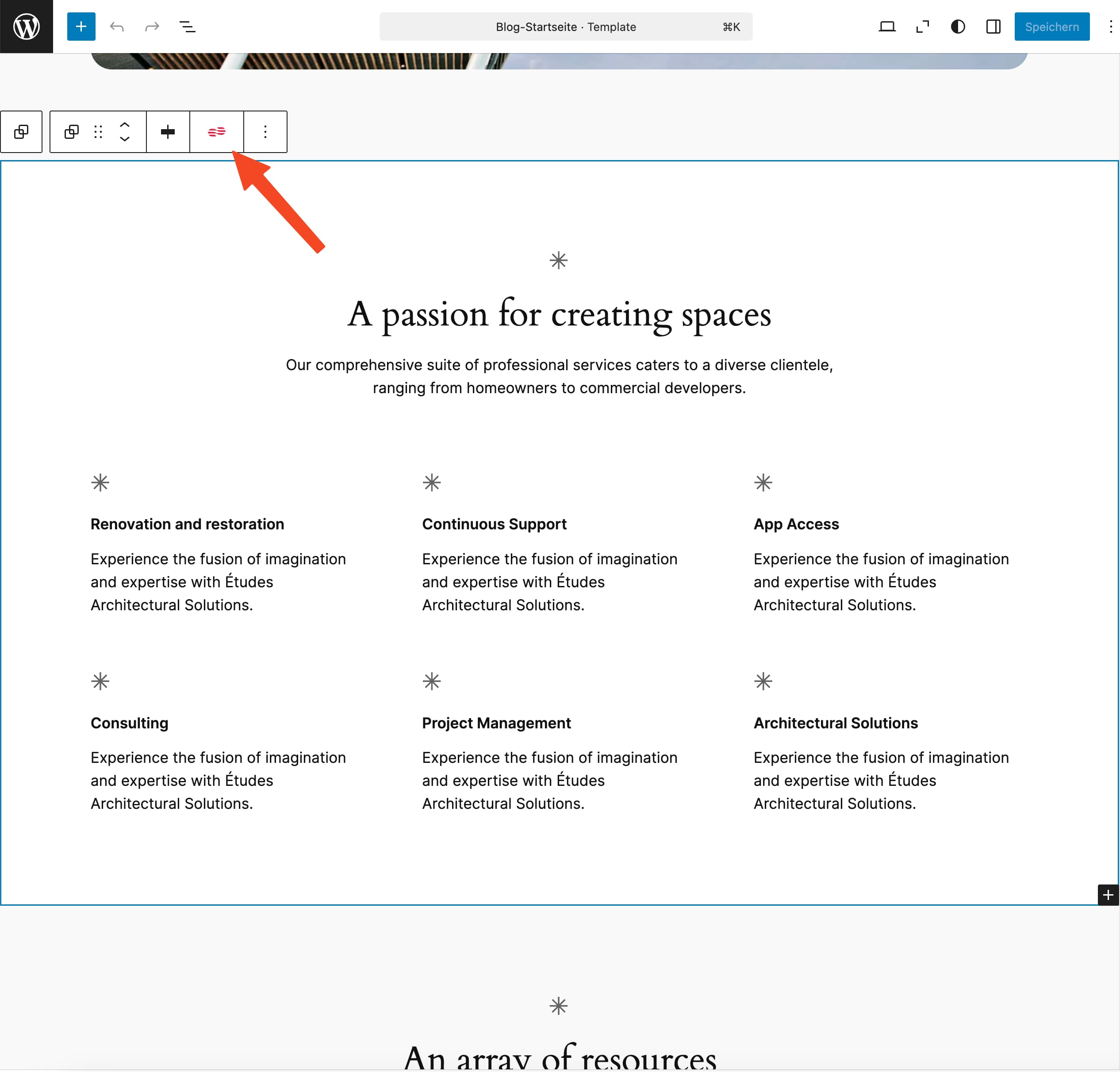
Semanticality™ Rules Editor Button in the Gutenberg Block Editor

Open Semanticality™ Rules Editor for the block

Before you start, select the section in the Block Editor and open the Semanticality™ Rules Editor. The rules you define here only apply to this block, unless you save them as a global rule.

  1. Select a section in the Gutenberg Block Editor that you want to customize.
  2. Press the Semanticality™ Button in the block's toolbar.

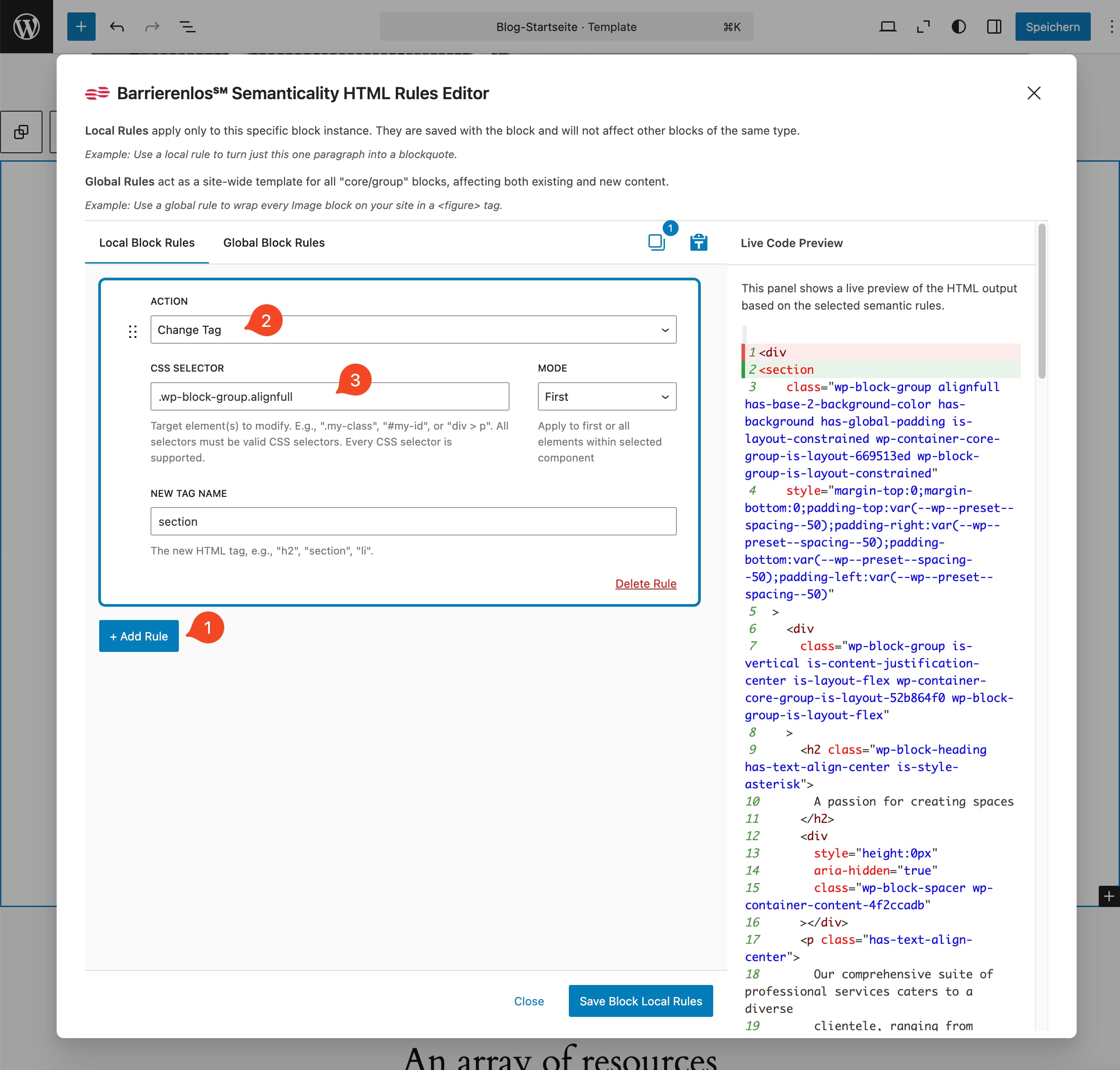
Rule 1: div → section

First, you convert the block wrapper from a div to a section. On the right in the Live Code Preview you can see the change immediately.

  1. Click on Local Block Rules in the tab + Add Rule. If you want to save the rule for all blocks of this type on the entire website, you can also create it in the tab Global Block Rules.
  2. Select Change Tag as the Action.
  3. Define the CSS selector of the block wrapper (e.g. .wp-block-group with Mode on First).
Semanticality™ Rules Editor with rule to change a div to a section
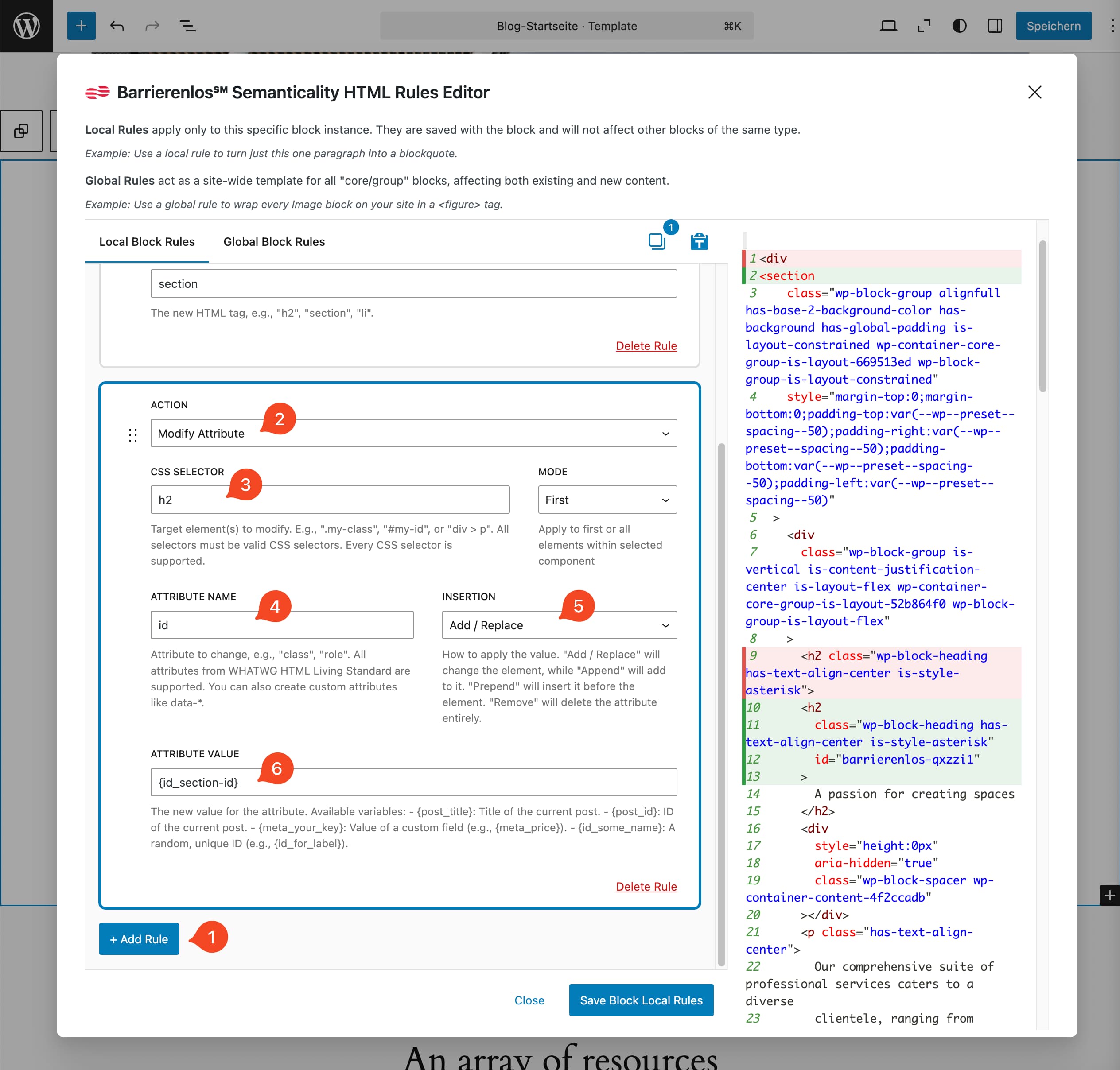
Semanticality™ Rules Editor with rule to assign an ID to a heading

Rule 2: Heading ID

Next, you give the heading a stable ID that you can reference later.

  1. Click on + Add Rule again to add another rule.
  2. For Action, this time select Modify Attribute.
  3. Define the CSS selector of the heading (e.g. h2 with Mode on First).
  4. Select id as the attribute in the Attribute Name field.
  5. In the Insertion field, select Add / Replace.
  6. In the {code} field, enter the ID. You can use a static ID like hero-title or a dynamic ID like {{ id_dein_label }} here.

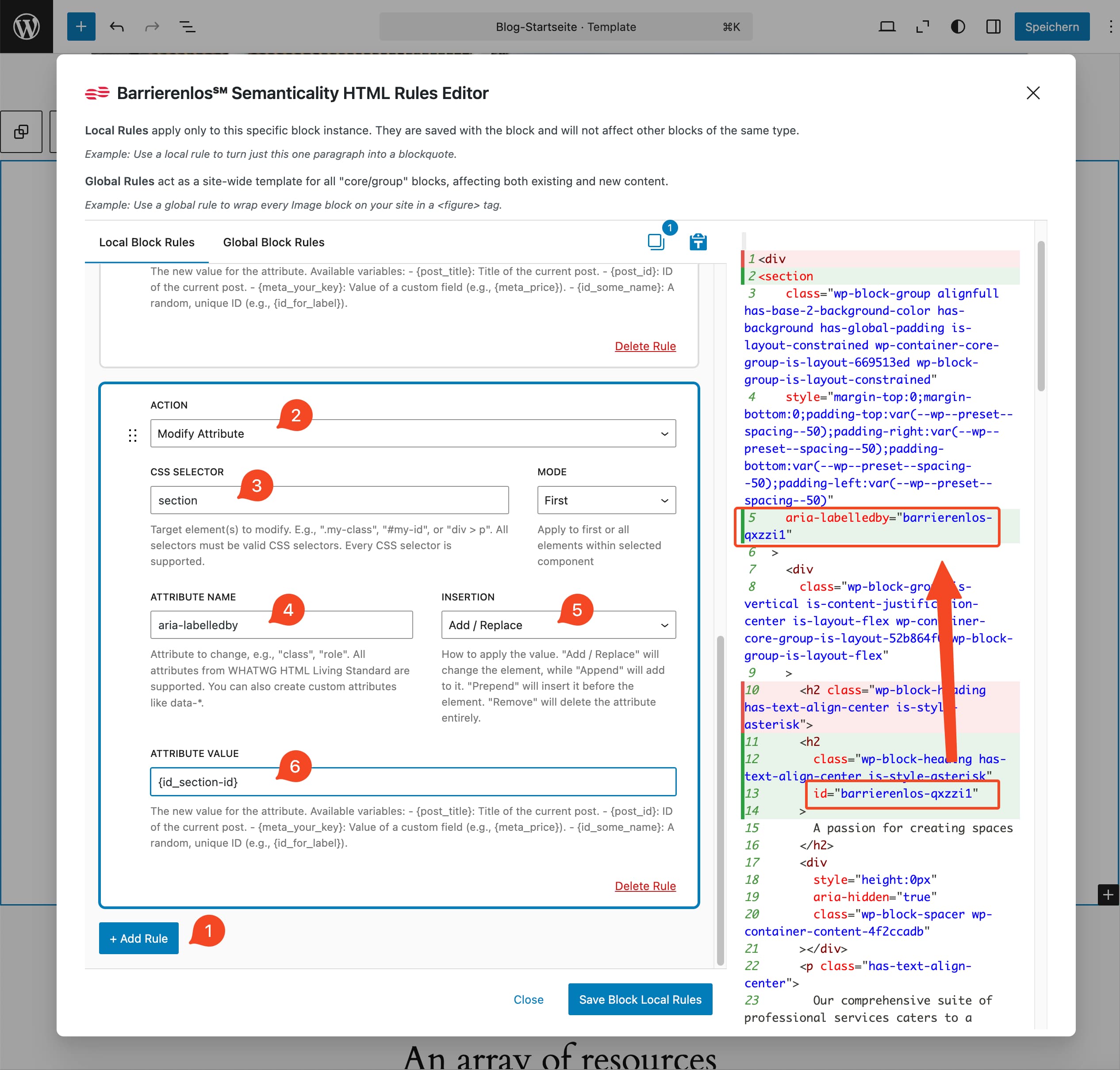
Rule 3: aria-labelledby

Finally, you add the aria-labelledby attribute to the block wrapper, which refers to the ID of the heading.

  1. Click on + Add Rule again to add another rule.
  2. For Action, this time select Modify Attribute.
  3. Define the CSS selector of the section (e.g. section with Mode on First. The lower rules always assume that the upper ones have already been applied. That's why you can now simply select section here).
  4. Select aria-labelledby as the attribute in the Attribute Name field.
  5. In the Insertion field, select Add / Replace.
  6. In the Value field, enter the ID you gave the heading.
  7. Click on Save Block Local Rules to save the rules and apply them to the block.
  8. Save the page and test in the frontend. If you do not save the page, the rules will be lost after leaving the editor.
Semanticality™ Rules Editor with rule to assign an aria-labelledby attribute to a Section

Result: Screen readers recognize a named landmark, navigation is now more meaningful, and you meet WCAG 2.2: 1.3.1, 2.4.1 at the markup level - completely without theme modification.

  • Act now!

    Semanticality™ is the pragmatic solution to make your customers' WordPress Gutenberg websites accessible at the markup level and protect them from up to €550,000 in fines for EAA violations***.

    Get started with Semanticality™ now

    28.06.2025

    Entry into force of the EAA (BFSG)
  • Who is the Semanticality™ Plugin suitable for?

    We developed Semanticality™ for ourselves as accessibility experts and have successfully used it in numerous projects. Now we want to share this tool with other developers.

    Choose Your Semanticality™ Plan – all features, tiered by sites & support.

    An investment that pays off immediately. Compare the cost of an annual license with a developer's hourly rate (approx. €100). After just 2-3 hours saved Semanticality™ pays for itself for the entire year*!

    All licenses are based on simultaneous activations and are transferable at any time. Finish a client project, deactivate the license with one click, and use it for your next job. Perfect for a developer's daily work.

    Semanticality™ Licenses at a Glance - Explainer Video

    In this short video, you will learn about the license models available for Semanticality™, which features are included, and how to select the right license for your needs.

    Test Semanticality™ for 14 days 100% risk-free: If you are not convinced, you will get your money back – no questions asked*****. Secure your 20% Launch Discount for the first year with the code LAUNCH20 until November 30, 2025.

    Solo License

    For freelancers, side projects and single websites.

    • License key for 1 simultaneous website activation (Prod + Staging incl.).
    • Flexibly transferable: License transferable from old to a new project at any time.
    • All Features: Tag-Switching, Attribute Rules, Global & Local Rules, Live Preview, Meta Fields, ID Generator.
    • User manual & Developer Documentation.
    • After expiry → Plugin remains functional, but without updates & support****.
    • 1 year updates & Standard Support (Response usually ≤ 3 working days).
    • Support quota: max. 2 tickets / month (unused tickets expire at the end of the month).
    • Support Scope: Installation, basic configuration, operation as well as basic questions about digital accessibility (WCAG/EAA (BFSG)) in the context of the plugin. No individual project or legal advice, no third-party fixes.
    • Upgrade/Downgrade possible at any time.
    • 14 days money-back, no ifs or buts.
    • Access to the partner program with 20% recurring commission per referral (e.g. to your clients).

    Alter Preis: €119 / year, neuer Preis: €95.20 / year

    Studio License

    For small teams & agencies with multiple projects.

    • License key for 5 simultaneous website activations (Prod + Staging incl.).
    • Flexibly transferable: Licenses transferable from old to new projects at any time.
    • All Features: Tag-Switching, Attribute Rules, Global & Local Rules, Live Preview, Meta Fields, ID Generator.
    • User manual & Developer Documentation.
    • After expiry → Plugin remains functional, but without updates & support****.
    • 1 year updates & Prioritized Support (Response usually ≤ 1 working day).
    • Support quota: max. 5 tickets / month (unused tickets expire at the end of the month).
    • Support Scope: Installation, basic configuration, operation as well as basic questions about digital accessibility (WCAG/EAA (BFSG)) in the context of the plugin. No individual project or legal advice, no third-party fixes.
    • Upgrade/Downgrade possible at any time.
    • 14 days money-back, no ifs or buts.
    • Access to the partner program with 20% recurring commission per referral (e.g. to your clients).

    Alter Preis: €249 / year, neuer Preis: €199.20 / year

    Agency License

    For agencies with an active project pipeline.

    • License key for 25 simultaneous website activations (Prod + Staging incl.).
    • Flexibly transferable: Licenses transferable from old to new projects at any time.
    • All Features: Tag-Switching, Attribute Rules, Global & Local Rules, Live Preview, Meta Fields, ID Generator.
    • User manual & Developer Documentation.
    • 1× 60-min onboarding call for the team.
    • After expiry → Plugin remains functional, but without updates & support****.
    • 1 year updates & Prioritized Support (Response usually ≤ 1 working day) with escalation path.
    • Support quota: max. 10 tickets / month (unused tickets expire at the end of the month).
    • Support Scope: Installation, basic configuration, operation as well as basic questions about digital accessibility (WCAG/EAA (BFSG)) in the context of the plugin. No individual project or legal advice, no third-party fixes.
    • Upgrade/downgrade possible at any time.
    • 14-day money-back guarantee, no questions asked.
    • Access to the partner program with 20% recurring commission per recurring commission per referral (e.g., to your clients).

    Alter Preis: €499 / year, neuer Preis: €399.20 / year

    Enterprise License

    For organizations with more than 50 sites and formal SLA requirements (Support, Security Review, DPO coordination).

    • License key for 50+ Sites (Prod + Staging incl.).
    • Optional Private Builds.
    • Individual support and SLA package upon request.
    • Individual quote & volume pricing.

    Preis: upon request

    Consultation Appointment for Enterprise

    Note: Payment processing and invoicing are handled by our partner Freemius, Inc. (USA), who acts as the Merchant of Record. The contractual partner for the plugin remains Dmitry Dugarev (barrierenlos.com). Automatic renewal annually at the full price without discount. Cancellation is possible at any time until the renewal date. Prices plus VAT, if applicable.

    Enthusiastic about Semanticality™? Recommend it!

    Secure 20% commission on the first purchase and all renewals of your referred customers – without minimum turnover or obligations. Simply register → recommend → earn.

    Do you still have questions?